Anúncios
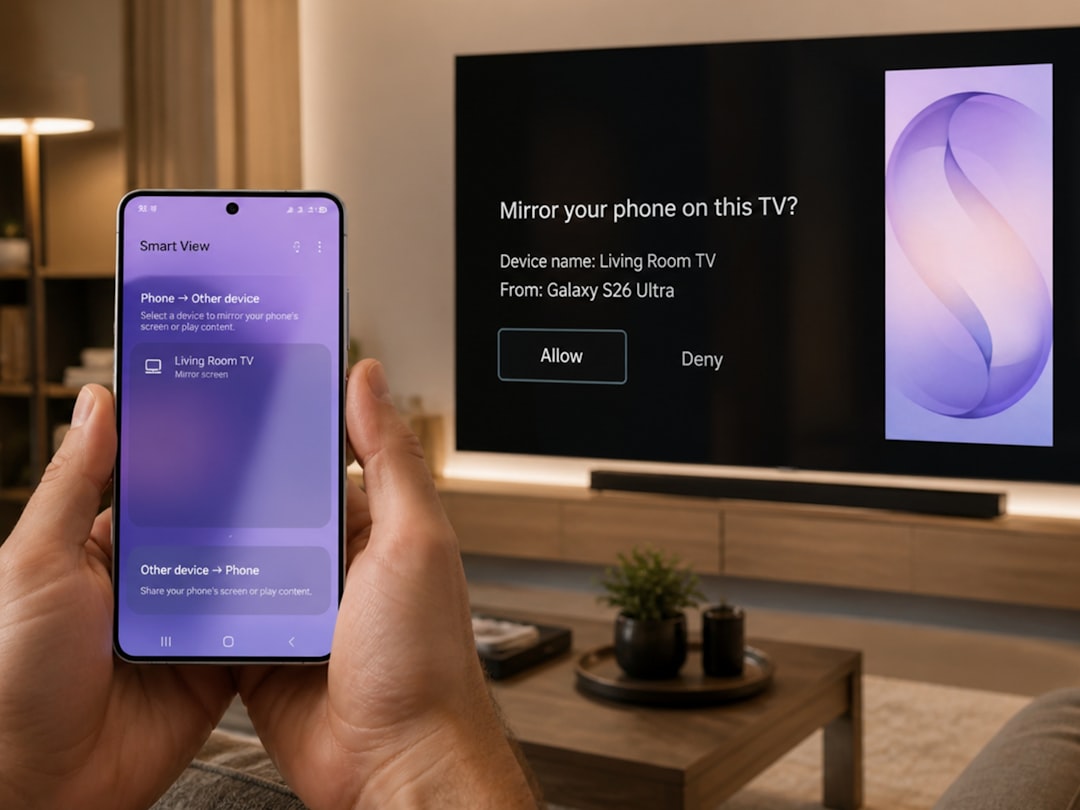
Streaming entertainment directly on your smartphone has revolutionized how we consume television content, offering unprecedented flexibility and convenience for viewers worldwide.


Gone are the days when watching television meant being tethered to a living room couch at specific broadcast times. Mobile technology has transformed our phones into portable entertainment hubs, capable of streaming live channels, on-demand shows, and premium content from virtually anywhere with an internet connection.
This shift has created a booming market of applications designed specifically for mobile TV viewing. Whether you’re commuting, traveling, or simply prefer watching from bed, these apps deliver thousands of channels and content libraries directly to your pocket. Understanding which options best suit your needs can enhance your viewing experience significantly.
📱 Why Mobile TV Apps Have Become Essential
The statistics speak volumes about this entertainment revolution. Over 70% of smartphone users now watch video content on their devices regularly, with mobile TV apps accounting for a substantial portion of that consumption. This dramatic shift reflects changing lifestyle patterns where flexibility trumps traditional viewing habits.
Modern mobile TV applications offer several compelling advantages that traditional television simply cannot match. You gain the freedom to watch content during lunch breaks, while waiting in line, or during travel delays. The ability to pause live TV and resume later transforms how we interact with broadcast content.
Battery optimization and data management features have improved dramatically in recent years. Most quality apps now include download capabilities for offline viewing, quality adjustment settings to conserve data, and picture-in-picture modes that let you multitask while watching.
🎯 Top Categories of TV Streaming Applications
The mobile TV landscape divides into several distinct categories, each serving different viewing preferences and budgets. Understanding these categories helps you identify which type aligns with your entertainment needs.
Live TV Streaming Services
These platforms replicate traditional cable experiences by offering live channel streaming from major networks. Services like YouTube TV, Hulu + Live TV, and Sling TV provide access to sports, news, and entertainment channels as they broadcast in real-time.
Most live TV apps include features such as:
- Cloud DVR functionality to record shows automatically
- Multiple simultaneous streams for family sharing
- Channel guides with scheduling information
- Pause and rewind capabilities on live broadcasts
- Integration with smart home devices
Pricing typically ranges from $35 to $75 monthly depending on channel packages, with most services offering free trial periods to test their platforms before committing.
On-Demand Streaming Platforms
Netflix, Amazon Prime Video, Disney+, and HBO Max dominate this category by providing extensive libraries of movies, series, and original productions. Unlike live TV apps, these focus on binge-watching experiences with complete seasons available immediately.
These platforms excel at personalized recommendations, using sophisticated algorithms to suggest content based on viewing history. Download features allow you to prepare entertainment for flights or areas with poor connectivity.
Free Ad-Supported Television (FAST)
Applications like Pluto TV, Tubi, and Xumo offer completely free access to hundreds of channels and thousands of on-demand titles. The trade-off involves watching advertisements, but the zero subscription cost makes these attractive options for budget-conscious viewers.
FAST services have grown exponentially, with Pluto TV alone reporting over 70 million active users. Content quality has improved significantly as these platforms secure licensing deals with major studios.
Network-Specific Apps
Individual broadcasters like NBC, ABC, CBS, and FOX maintain dedicated applications offering their programming directly. These typically provide free access to recent episodes with limited commercials, though some premium content requires cable authentication.
Nenhum dado válido encontrado para as URLs fornecidas.
🔍 Essential Features to Evaluate
Not all TV streaming applications deliver the same experience. When selecting which apps to install, several critical features separate exceptional services from mediocre ones.
Video Quality and Streaming Technology
The best applications support HD and 4K streaming when bandwidth permits, automatically adjusting quality based on connection speed. Look for apps that clearly indicate supported resolutions and offer manual quality controls for data management.
Adaptive bitrate streaming ensures smooth playback by dynamically adjusting video quality to match your network conditions. This technology prevents frustrating buffering interruptions that ruin viewing experiences.
User Interface Design
Intuitive navigation makes the difference between enjoyable browsing and frustrated searching. Quality apps feature clean layouts with logical categorization, powerful search functions, and customizable favorites lists.
The best interfaces include:
- Thumbnail previews when scrubbing through content
- Continue watching sections that remember your progress
- Genre-based organization with effective filtering
- Minimal steps between opening the app and starting playback
- Dark mode options for comfortable nighttime viewing
Cross-Platform Synchronization
Premium services synchronize viewing progress across devices, letting you start watching on your phone and seamlessly continue on a tablet or smart TV. This multi-device ecosystem enhances flexibility significantly.
Offline Viewing Capabilities
Download functionality proves invaluable for travelers or those with unreliable internet access. Evaluate how many titles you can download simultaneously, storage space requirements, and expiration policies for downloaded content.
💰 Cost Comparison and Value Analysis
Understanding the true cost of mobile TV requires looking beyond monthly subscription fees to assess overall value delivered by each platform.
| Service Type | Average Monthly Cost | Content Volume | Ad Experience |
|---|---|---|---|
| Premium On-Demand | $8-$18 | Thousands of titles | Ad-free (mostly) |
| Live TV Streaming | $35-$75 | 50-100+ channels | Regular commercials |
| FAST Platforms | Free | 100+ channels, 10,000+ titles | Frequent ads |
| Network Apps | Free-$10 | Limited library | Moderate ads |
Many households now maintain multiple subscriptions, averaging 3-4 services simultaneously. Strategic selection based on content preferences helps optimize spending while maintaining access to desired programming.
Consider rotating subscriptions seasonally, subscribing to specific services when they release new seasons of your favorite shows, then canceling until the next release. This strategy can reduce annual entertainment costs by 30-40%.
📊 Data Usage and Mobile Performance
Streaming video consumes significant mobile data, making it essential to understand usage patterns and implement management strategies to avoid overage charges or throttling.
Typical Data Consumption Rates
Standard definition (480p) streaming uses approximately 0.7 GB per hour, while HD (720p) consumes about 1.5 GB hourly. Full HD (1080p) can use 3 GB per hour, and 4K streaming may consume 7 GB or more in the same timeframe.
A single two-hour movie in HD quality uses roughly 3 GB of data—a significant portion of many mobile plans. Monitoring usage through your phone’s settings helps prevent unexpected charges.
Data-Saving Strategies
Most quality TV apps include data-saving modes that reduce video quality on cellular connections while maintaining higher quality on Wi-Fi. Enable these settings to stretch your data plan further without manually adjusting quality each time.
Additional conservation tactics include:
- Downloading content over Wi-Fi before traveling
- Setting apps to Wi-Fi-only streaming by default
- Reducing default quality settings to 480p or 720p
- Disabling auto-play features that stream unwanted previews
- Monitoring data usage through native phone settings weekly
🔒 Security and Privacy Considerations
As with any application handling payment information and personal data, TV streaming apps require careful evaluation of security practices and privacy policies.
Legitimate services implement encryption protocols to protect payment details and viewing data. Before providing credit card information, verify the app comes from the official developer and check recent reviews for security concerns.
Privacy policies reveal how platforms use your viewing history. Some services sell anonymized data to advertisers, while others maintain stricter privacy standards. Reading these policies, though tedious, helps you understand what information companies collect and share.
Avoiding Suspicious Applications
The popularity of TV streaming has spawned numerous questionable apps promising free access to premium content. These often violate copyright laws and may contain malware or aggressive adware.
Red flags indicating potentially dangerous apps include:
- Promises of unlimited free premium content from major studios
- Requests for excessive permissions unrelated to video playback
- Poor grammar in descriptions and within the app interface
- Few or suspiciously positive reviews
- Unknown developers with no web presence
Stick with recognized brands and verified developers to ensure safe, legal viewing experiences that respect content creators and your device security.
🌐 International Content and Regional Restrictions
Geographic licensing agreements mean content availability varies dramatically by location. A show available in the United States might be restricted in Europe, while certain international productions may not appear in American app versions.
This reality has led to increased interest in VPN services that mask geographic location, though many streaming platforms actively block VPN connections per licensing requirements. Terms of service typically prohibit this circumvention, potentially resulting in account suspension.
Legal alternatives for accessing international content include services specifically designed for expatriates or multicultural audiences. Apps like AcornTV, BritBox, and Viki specialize in content from specific regions, providing legitimate access to international programming.
⚡ Performance Optimization Tips
Even excellent apps can underperform on older devices or with suboptimal settings. Implementing these optimization strategies ensures the smoothest possible viewing experience.
Device-Level Improvements
Close unnecessary background applications before streaming to free up processing power and RAM. Clearing app cache periodically removes temporary files that can slow performance or cause glitches.
Keep both your operating system and streaming apps updated to the latest versions, as updates frequently include performance improvements and bug fixes that enhance stability.
Network Optimization
Position yourself closer to Wi-Fi routers for stronger signals, or consider upgrading to mesh network systems that eliminate dead zones. When using cellular data, 4G LTE or 5G connections provide sufficient bandwidth for smooth HD streaming, while 3G networks struggle with anything beyond standard definition.
If you experience frequent buffering despite good internet speeds, try restarting your router and phone, as this simple step resolves many temporary connectivity issues.
👨👩👧👦 Family-Friendly Features and Parental Controls
Households with children benefit from robust parental control systems that filter inappropriate content and limit viewing time. Sophisticated platforms offer individual profiles with age-appropriate restrictions.
Look for services that provide:
- PIN-protected access to mature content categories
- Age-based profile settings (Kids, Teen, Adult)
- Viewing time limits and scheduling restrictions
- Content rating filters (G, PG, PG-13, R, etc.)
- Activity reports showing what children watched
Disney+ and Netflix offer particularly comprehensive parental control systems, while some FAST services provide more limited filtering options. Evaluate these features carefully when selecting apps for family use.
🎮 Emerging Technologies and Future Trends
The mobile TV landscape continues evolving rapidly as new technologies emerge and viewing habits shift. Understanding upcoming trends helps you anticipate which platforms will remain relevant.
Interactive and Personalized Content
Experimental programming allows viewers to influence storylines through choice-based narratives. While still niche, this interactive entertainment represents potential future directions for mobile content consumption.
5G Network Integration
As 5G networks expand globally, mobile streaming quality will approach home broadband performance. This infrastructure improvement enables reliable 4K streaming on cellular connections without buffering concerns.
AI-Powered Recommendations
Machine learning algorithms grow increasingly sophisticated at predicting viewer preferences, potentially reducing time spent searching for content. Future systems may proactively suggest programming based on mood, time of day, and viewing patterns.
🏆 Making Your Final Selection
Choosing the right TV streaming applications depends on individual preferences, budget constraints, and content priorities. Start by identifying your primary viewing interests—sports, movies, series, news, or a combination.
Take advantage of free trial periods offered by most premium services, testing interfaces and content libraries before committing financially. Many viewers find that 2-3 complementary services provide optimal coverage across different content types.
Remember that flexibility remains a key advantage of mobile streaming. Unlike traditional cable contracts, these services allow monthly cancellations without penalties, letting you adapt your entertainment portfolio as needs change throughout the year.
The transformation of smartphones into powerful entertainment centers represents one of technology’s most consumer-friendly developments. With the right applications installed and properly configured, your mobile device becomes a gateway to virtually unlimited programming accessible anywhere, anytime—fundamentally changing how we define television viewing in the modern era.